
Most people use ChatGPT the same way.
They ask it to write an email, summarize something, explain a difficult topic, or generate a few ideas.
Useful? Absolutely.
But that’s barely scratching the surface.
The real power of ChatGPT appears when you stop treating it like a simple question-and-answer chatbot and start giving it commands that change how it approaches a task.
You can make ChatGPT challenge your ideas, build decision systems, turn messy thoughts into reusable workflows, simulate different experts, reverse-engineer successful content, create learning systems, generate templates, analyze patterns, and even help you discover problems you didn’t know you had.
Below are 25 surprisingly powerful things you can do with ChatGPT in 2026, along with commands you can actually try yourself.
1. Ask ChatGPT to Find What You’re Missing
Most people ask:
“Is this a good idea?”
Try this instead:
Command:
Analyze this idea and tell me what I am not considering.
This changes the conversation completely.
Instead of simply polishing your idea, ChatGPT looks for:
- overlooked risks
- missing information
- hidden assumptions
- potential objections
- alternative possibilities
This is especially useful for business ideas, marketing campaigns, projects, major purchases, and important decisions.
Try this:
Here is my plan. Don’t improve it yet. First, identify everything I may have overlooked.
Sometimes the best AI answer isn’t a solution.
It’s the question you forgot to ask.
2. Turn ChatGPT Into a Devil’s Advocate
AI assistants can sometimes be a little too agreeable.
You can fix that.
Use:
Act as a devil’s advocate and argue against my idea.
Now ChatGPT has to challenge your thinking instead of automatically supporting it.
For example:
I want to launch an online bakery. Act as a devil’s advocate and give me 10 reasons why this business might fail.
Once you’ve seen the weaknesses, follow with:
Now tell me how I could reduce each of those risks.
This creates a much more useful brainstorming session.
3. Use the “Red Team” Command
Here’s a stronger version of the previous trick.
Try:
Red-team this strategy.
In simple terms, red-teaming means deliberately trying to find weaknesses in a plan before reality finds them for you.
Ask ChatGPT to look for:
- failure points
- loopholes
- weak assumptions
- reputation risks
- financial risks
- customer objections
Example:
Red-team my marketing strategy and identify the five most likely reasons it could fail.
This is one of the most useful advanced ChatGPT prompts for entrepreneurs and professionals.
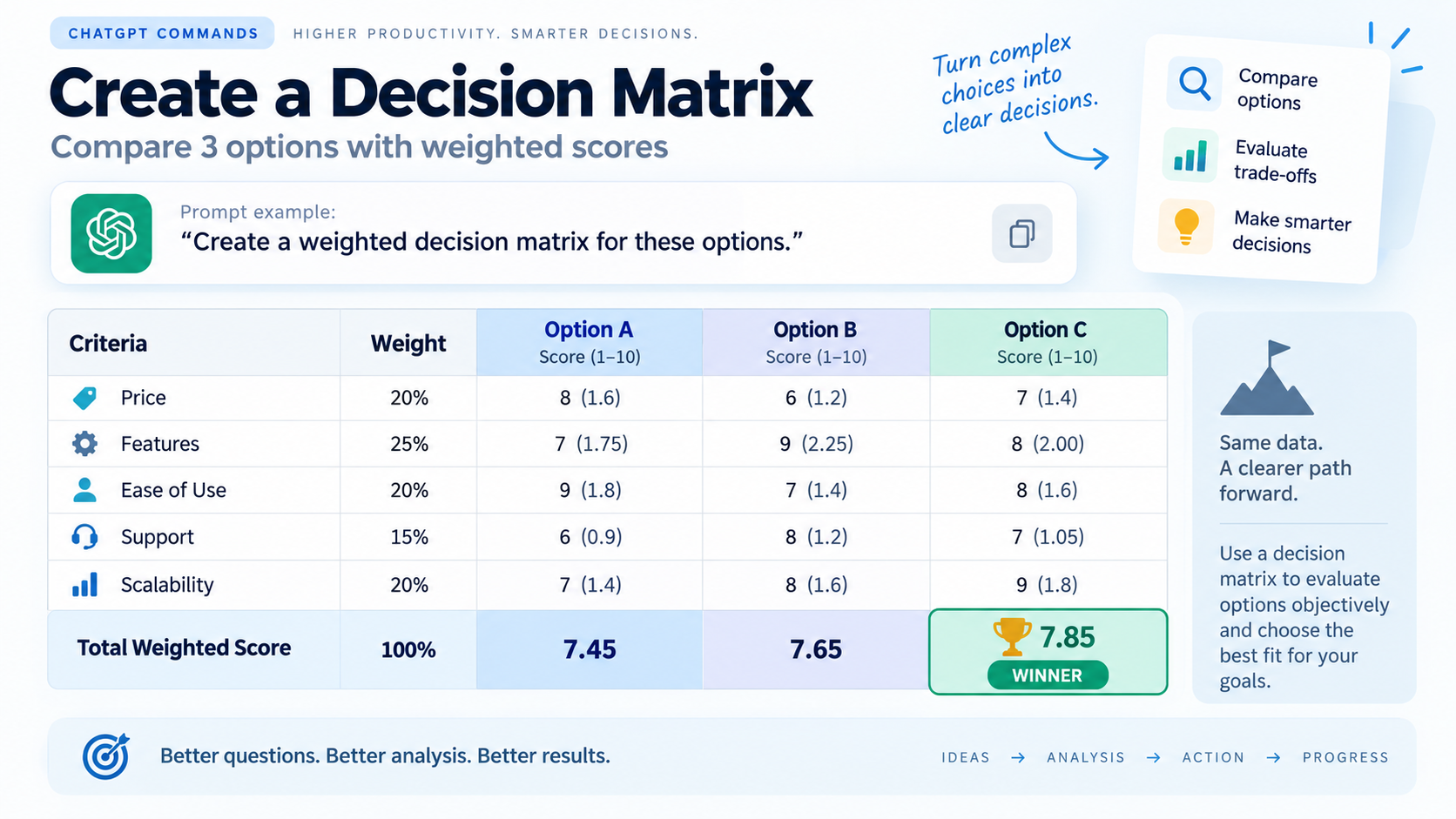
4. Make ChatGPT Create a Decision Matrix
Can’t choose between several options?
Don’t ask:
Which one is best?
Instead use:
Create a weighted decision matrix for these options.
Suppose you’re choosing between three laptops.
Ask ChatGPT to score them based on:
- price
- performance
- battery
- portability
- display
- durability
Then tell it which factors matter most to you.
You can use this same ChatGPT command to compare:
- jobs
- apartments
- business ideas
- software tools
- destinations
- suppliers
- courses
Suddenly, a vague decision becomes measurable.
5. Ask for the 80/20 Version
The Pareto Principle suggests that a relatively small number of actions often produce a large share of the results.
You can ask ChatGPT to find them.
Use:
Give me the 80/20 version of this.
For example:
I want to learn SEO. What is the 80/20 — the small number of skills that will give me most of the practical results?
Or:
Analyze this marketing plan and identify the 20% of activities likely to create 80% of the impact.
This is incredibly useful when you’re overwhelmed by too much information.
6. Make ChatGPT Explain Something at Three Levels
Ever receive an explanation that is either painfully basic or unnecessarily complicated?
Use:
Explain this at beginner, intermediate and expert level.
For example:
Explain artificial intelligence at beginner, intermediate and expert level.
You’ll get three different versions of the same concept.
This is especially powerful for learning technical subjects because you can see how understanding develops from simple concepts to advanced ones.
7. Ask ChatGPT to Reverse-Engineer Something Successful
This one is brilliant for creators and marketers.
Instead of asking:
Give me a viral YouTube idea.
Try:
Reverse-engineer why this video worked.
Provide examples of successful:
- social posts
- headlines
- ads
- videos
- landing pages
- emails
- products
Then ask ChatGPT to identify patterns.
Example:
Analyze these five successful video titles. Reverse-engineer the psychological patterns behind them and create a reusable formula.
Now you’re not simply copying an idea.
You’re learning the structure behind it.
8. Turn Any Good Result Into a Reusable Prompt
Imagine ChatGPT gives you exactly the kind of output you wanted.
Instead of losing that workflow, ask:
Reverse-engineer the prompt that would consistently produce an answer like this.
ChatGPT can turn the successful result into a reusable template.
You can then save it for future tasks.
This is a surprisingly powerful way to build your own personal ChatGPT prompt library.
9. Make ChatGPT Interview You Before Answering
Most weak AI answers happen because ChatGPT doesn’t have enough context.
Here’s the fix.
Use:
Before answering, ask me the questions you need to give me the best possible result.
Suppose you want a marketing strategy.
Instead of immediately generating one, ChatGPT may ask about:
- your business
- audience
- budget
- competitors
- goals
- current channels
- timeline
Once it understands your situation, the final response becomes far more personalized.
10. Ask ChatGPT to Improve Something Without Changing Your Voice
One problem with AI rewriting is that suddenly everyone starts sounding like the same corporate robot.
Try:
Improve this without changing my natural writing style.
Even better:
Fix grammar, clarity and flow, but preserve my vocabulary, tone and sentence style.
This is excellent for:
- blog posts
- social media
- personal messages
- LinkedIn posts
- emails
- scripts
The goal shouldn’t always be “make this sound professional.”
Sometimes it should be:
Make this sound like me — just better.
11. Turn Messy Notes Into a Proper System
Paste your random notes and say:
Turn these notes into an organized system.
ChatGPT can transform scattered thoughts into:
- categories
- workflows
- tasks
- priorities
- checklists
- reference sections
You can take this even further:
Turn this into a repeatable weekly workflow.
That’s useful for turning one-time work into something you can actually repeat.
12. Create a Standard Operating Procedure in Seconds
If you perform the same task repeatedly, ask:
Turn this process into an SOP.
SOP means Standard Operating Procedure.
For example:
Here is how I publish a blog post. Turn it into a professional SOP with steps, responsibilities, quality checks and a final checklist.
Businesses use SOPs so work can be repeated consistently.
You can create them for:
- content publishing
- client onboarding
- social media
- customer service
- sales
- website maintenance
- admin work
13. Convert Anything Into a Checklist
This sounds simple, but it is incredibly practical.
Use:
Convert this into an actionable checklist.
You can apply it to:
- articles
- meeting notes
- instructions
- project plans
- travel plans
- recipes
- reports
A long explanation becomes something you can actually execute.
14. Extract Every Action Item From a Conversation
Paste meeting notes, an email thread, or a long discussion and ask:
Extract every action item, owner, deadline and unresolved question.
ChatGPT can separate conversation from actual work.
You can also request:
Put everything into a table with Task, Owner, Deadline, Priority and Status.
Very handy after meetings where ten people talked for an hour and somehow nobody knows what they’re supposed to do next.
15. Simulate a Meeting Between Multiple Experts
Here’s where things get interesting.
Ask:
Simulate a discussion between a marketer, financial analyst and product designer about this idea.
Each role approaches the problem differently.
You can even tell them to disagree.
For example:
Have the three experts debate the idea. Each expert must challenge the others before reaching a conclusion.
This won’t replace actual experts, but it can expose perspectives you hadn’t considered.

16. Create Three Strategies: Safe, Balanced and Bold
Instead of asking ChatGPT for one recommendation, use:
Give me three approaches: conservative, balanced and aggressive.
For example:
Create three strategies for growing my blog traffic: safe, balanced and aggressive.
This gives you choices based on:
- risk
- budget
- speed
- effort
It’s often much more useful than receiving a single “best” answer.
17. Make ChatGPT Score Your Work
Want feedback that’s more measurable?
Try:
Score this from 1–10 using clear criteria.
For a blog post, you might request scores for:
- headline
- readability
- SEO
- originality
- structure
- usefulness
- engagement
Then ask:
Tell me exactly what would move each score closer to 10.
This creates a mini quality-control system.
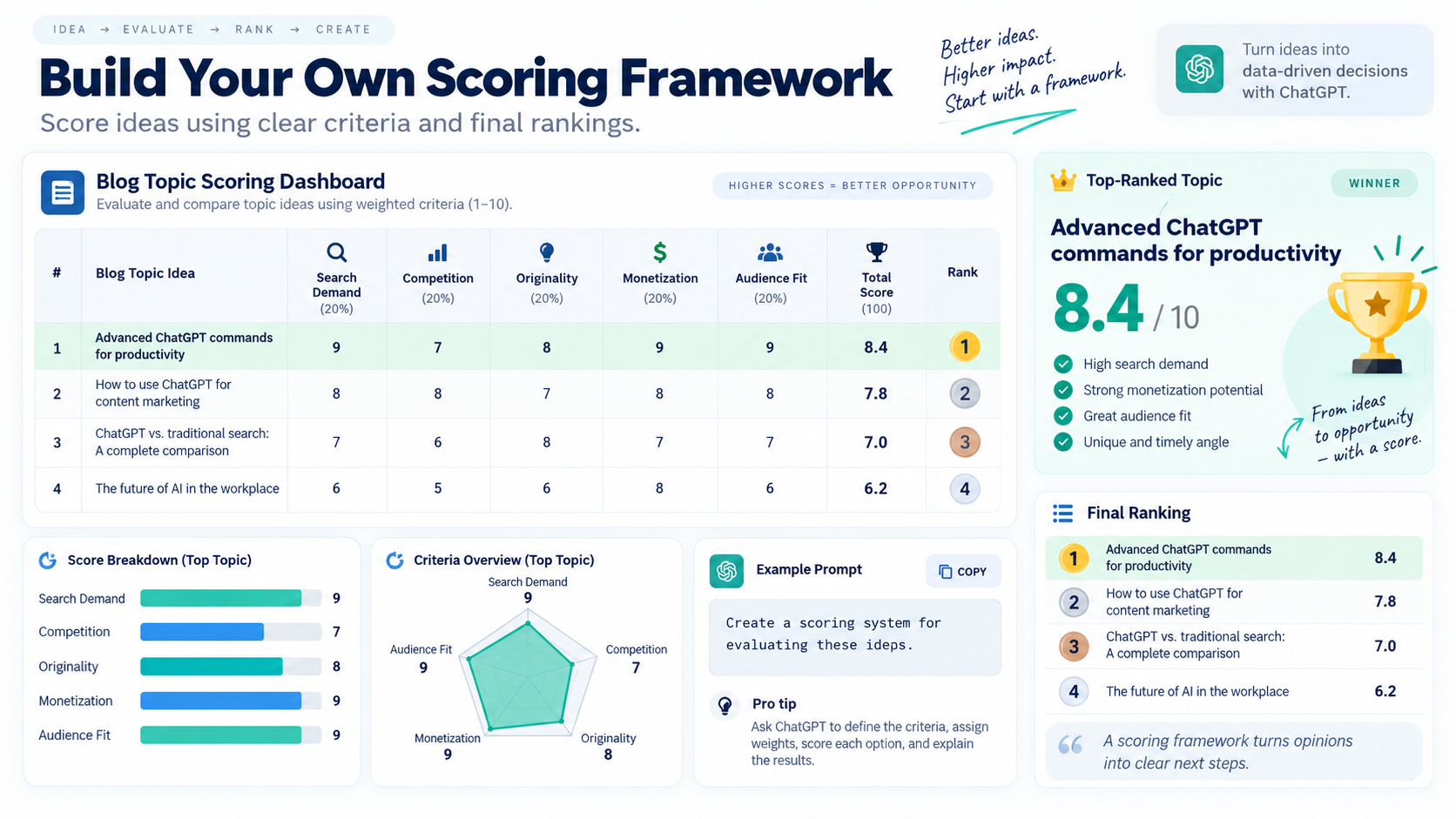
18. Build Your Own Scoring Framework
ChatGPT can go one step further and create the criteria itself.
Use:
Create a scoring system for evaluating these ideas.
For example:
Create a 100-point scoring framework for choosing blog topics based on search demand, competition, monetization potential, originality and audience relevance.
Now every future idea can be evaluated using the same system.
That’s much better than choosing ideas based purely on instinct.
19. Ask ChatGPT to Find Patterns
Give ChatGPT multiple examples and ask:
Find the patterns across these examples.
This can be used with:
- customer reviews
- YouTube comments
- social posts
- sales data
- headlines
- complaints
- interview responses
- survey answers
Then ask:
Which patterns appear most often, and what do they suggest?
Pattern recognition is one of those useful ChatGPT tricks that doesn’t get talked about enough.
20. Turn Data Into a Story
Numbers don’t always communicate themselves well.
Use:
Turn these numbers into a clear story for someone who is not technical.
You can also ask:
What is the most interesting story hidden in this data?
Instead of simply saying:
“Traffic increased by 18%.”
ChatGPT might help explain:
what increased, when it increased, what likely contributed, and why it matters.
This is especially useful for business reports and presentations.
21. Create a One-Page Cheat Sheet
Learning something complicated?
Ask:
Create a one-page cheat sheet for this topic.
You can request:
- key concepts
- formulas
- definitions
- shortcuts
- mistakes to avoid
- quick examples
For example:
Create a one-page SEO cheat sheet for beginners.
You can then turn the cheat sheet into a reference document, study aid, or even a downloadable lead magnet.
22. Build a Learning Roadmap From Beginner to Expert
Instead of collecting random tutorials, say:
Create a beginner-to-advanced learning roadmap for [topic].
Then make it more useful:
Divide it into milestones. Tell me what I should learn, practice and build at each stage.
You can create roadmaps for:
- SEO
- AI
- coding
- graphic design
- marketing
- photography
- Excel
- public speaking
Add:
Include a small project after every milestone.
Now your learning plan includes practice, not just reading.
23. Ask ChatGPT to Create a Framework Instead of Giving Advice
Advice solves one problem.
A framework can solve similar problems repeatedly.
Try:
Don’t give me the answer yet. Create a framework I can use to make this decision myself.
Suppose you’re deciding whether a blog topic is worth writing.
ChatGPT could create a framework based on:
- search demand
- competition
- relevance
- originality
- monetization
- authority
- content depth
Now you can reuse the same framework every time.
This is a true ChatGPT power-user technique.
24. Turn a Conversation Into a Template
If you’ve had a useful ChatGPT conversation, don’t let it disappear into your chat history.
Ask:
Turn everything we developed in this conversation into a reusable template.
For example, after developing a content strategy you might ask for:
- an input section
- repeatable steps
- a checklist
- prompts
- expected outputs
Suddenly, one useful conversation becomes a tool you can use again and again.
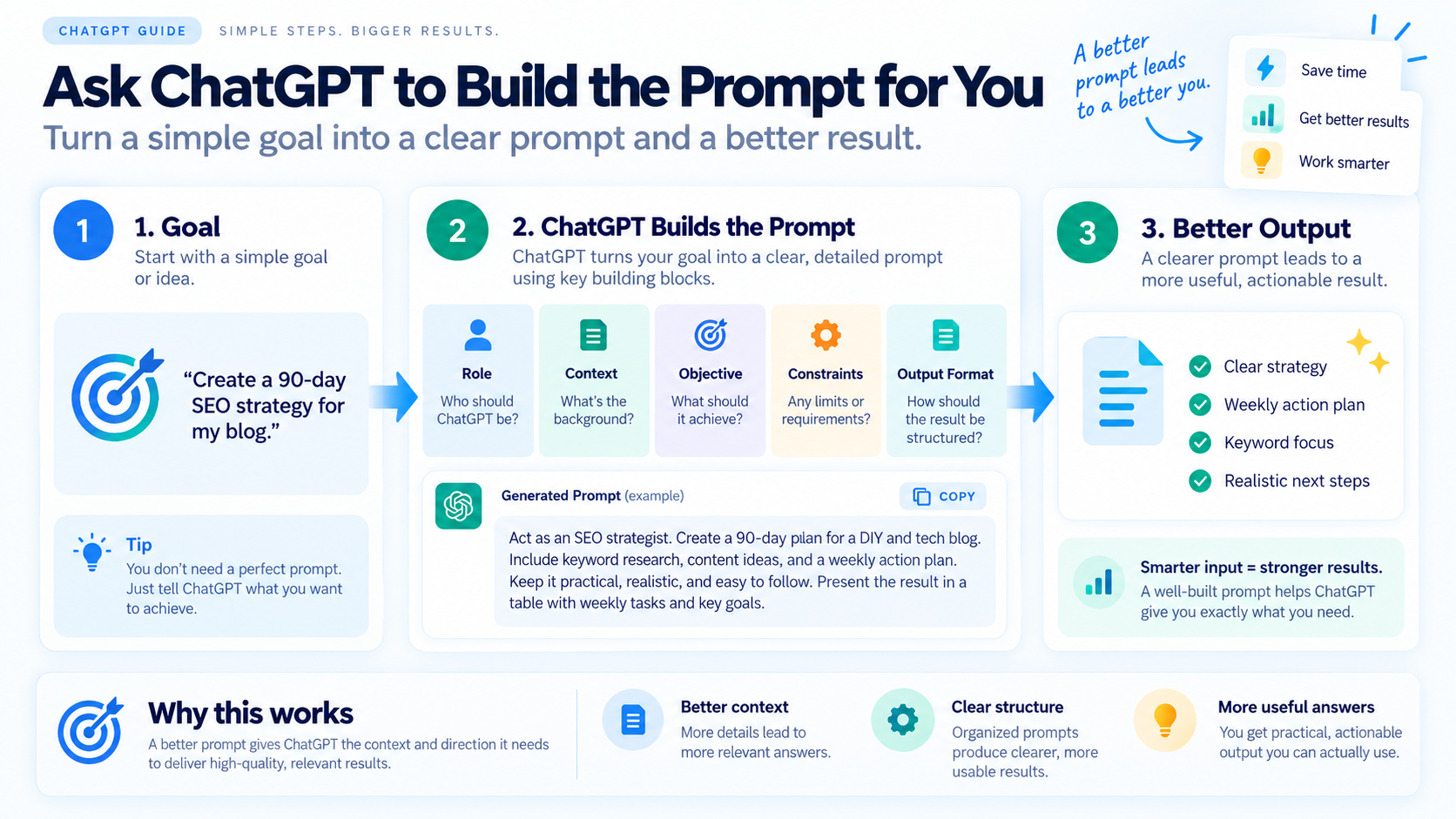
25. Ask ChatGPT to Build the Prompt for You
Perhaps the most useful ChatGPT command is the one that removes the need to know how to write prompts.
Simply say:
I want to achieve [goal]. Create the best prompt I should give ChatGPT to accomplish it.
For example:
I want ChatGPT to analyze my website and create a 90-day SEO strategy. Write the detailed prompt I should use.
ChatGPT can then create a structured prompt containing:
- role
- context
- objective
- constraints
- required research
- output format
- evaluation criteria
In other words, you can use ChatGPT to become better at using ChatGPT.
A little circular?
Yes.
Extremely useful?
Also yes.
Bonus Trick: Combine Commands
The really interesting results appear when you combine several techniques.
For example:
Before answering, ask me five questions about my business. Then create three strategies — safe, balanced and bold. Red-team each strategy, score them using a weighted decision matrix, and recommend the strongest option.
That’s one prompt.
Yet instead of receiving a generic answer, you’ve created a miniature decision-making process.
Here’s another:
Analyze these successful blog posts, identify the patterns they share, reverse-engineer why they rank, and turn those findings into a reusable article framework.
This is where ChatGPT starts feeling less like a chatbot and more like a flexible thinking tool.
A Simple Formula for Creating Powerful ChatGPT Commands
You don’t need to memorize hundreds of prompts.
Use this structure:
ROLE + TASK + CONTEXT + CONSTRAINT + OUTPUT
For example:
Role:
Act as an SEO strategist.
Task:
Analyze these blog ideas.
Context:
My website focuses on DIY, technology and everyday life.
Constraint:
Prioritize topics suitable for a relatively new website.
Output:
Rank them in a table and explain the reasoning.
Combine everything and you get:
Act as an SEO strategist. Analyze these blog ideas for a website focused on DIY, technology and everyday life. Prioritize topics that a relatively new website could realistically rank for. Score each idea based on search intent, competition, usefulness and click potential, then rank them in a table.
That’s dramatically better than:
Which blog topic is best?
Final Thoughts
The biggest mistake people make with ChatGPT is assuming the quality of the answer depends entirely on the AI.
It doesn’t.
A huge part of the result comes from how you direct the conversation.
Commands such as:
- Red-team this
- Find what I’m missing
- Give me the 80/20
- Reverse-engineer this
- Create a framework
- Turn this into a system
- Simulate three experts
- Score this
- Challenge my assumptions
can completely change the quality of the response.
So the next time you open ChatGPT, don’t just ask it for an answer.
Ask it to analyze, challenge, compare, simulate, score, reverse-engineer, organize, or build a system.
That’s when things get much more interesting.
Frequently Asked Questions
What are some powerful ChatGPT commands?
Some useful ChatGPT commands include “red-team this,” “act as a devil’s advocate,” “give me the 80/20 version,” “reverse-engineer this,” “create a decision matrix,” “find what I’m missing,” and “turn this into a reusable framework.”
Are ChatGPT commands the same as computer commands?
Not necessarily. In this context, ChatGPT commands are natural-language instructions or prompt patterns that tell ChatGPT how to approach a problem.
How do I get better results from ChatGPT?
Give ChatGPT context, a clear goal, important constraints, and your desired output format. You can also tell it to ask questions before answering when more information is needed.
What is the best ChatGPT prompt?
There isn’t one universal best prompt. A strong prompt clearly explains your goal and provides enough context for ChatGPT to understand what a useful answer should look like.
Can I combine several ChatGPT commands in one prompt?
Yes. Combining techniques such as role-playing, red-teaming, scoring, comparison, and structured output can produce much more sophisticated results than using a single basic instruction.


Reply